Home Blog Page 39

Garmin Venu 2 Plus: The Best of Both Worlds?

0

I had a voucher from Christmas burning a hole in my pocket earlier this year and decided to spend it on a watch. I wanted something that would help me keep a record of the exercise I was doing and also encourage me to be more active. As an Android user, the Apple Watch was out and as someone who goes on multi-day trips where charging isn’t guaranteed, I needed something that would track for days on end, which ruled out most of the Android-based Wear OS options. That left me with one stand-out brand to go for – Garmin.

The Garmin Venu 2 Plus strikes a balance between smartwatch and fitness wearable so it ticked lots of my boxes, it was also in budget at  €449 but you can find it now for €399 from Harvey Norman. Garmin has a huge choice of watches with many specialising in specific sports like running, golf, and swimming with extremely detailed data, but the Venu 2 Plus is more of a generalist. I don’t focus on one particular sport, I ride bikes, run, swim in the sea, and kayak, so this is a good fit for me.

Design

The design of the Venu 2 Plus is fine. It’s not going to win any awards or be very memorable, but it does the job and looks well when you’re out on the trail or walking about town. I went for the 43mm model, a middle-of-the-road choice, it doesn’t look too small on my wrist nor is it too bulky. The AMOLED screen blends nicely into the back bezel and stainless steel body–overall I don’t think anyone will hate how this looks. The build quality is brilliant though, I’ve put it through its paces and had a fair share of tumbles and it’s still looking brand new.

SpecsGarmin Venu 2 Plus
MaterialsGorilla Glass 3 & Stainless Steel
Display Size1.3”
Weight51g
ScreenAMOLED

Smartwatch Features

The Venu 2 Plus is what I like to think of as a leave-your-phone-at-home watch because I can head off to the shops, pay for things through Garmin Pay and listen to music through Spotify without needing my phone nearby. And when I do have my phone connected by Bluetooth, I can take calls and use my voice assistant. Personally, this isn’t my cup of tea, but it’s good to have the option there thanks to the built-in speaker and microphone.

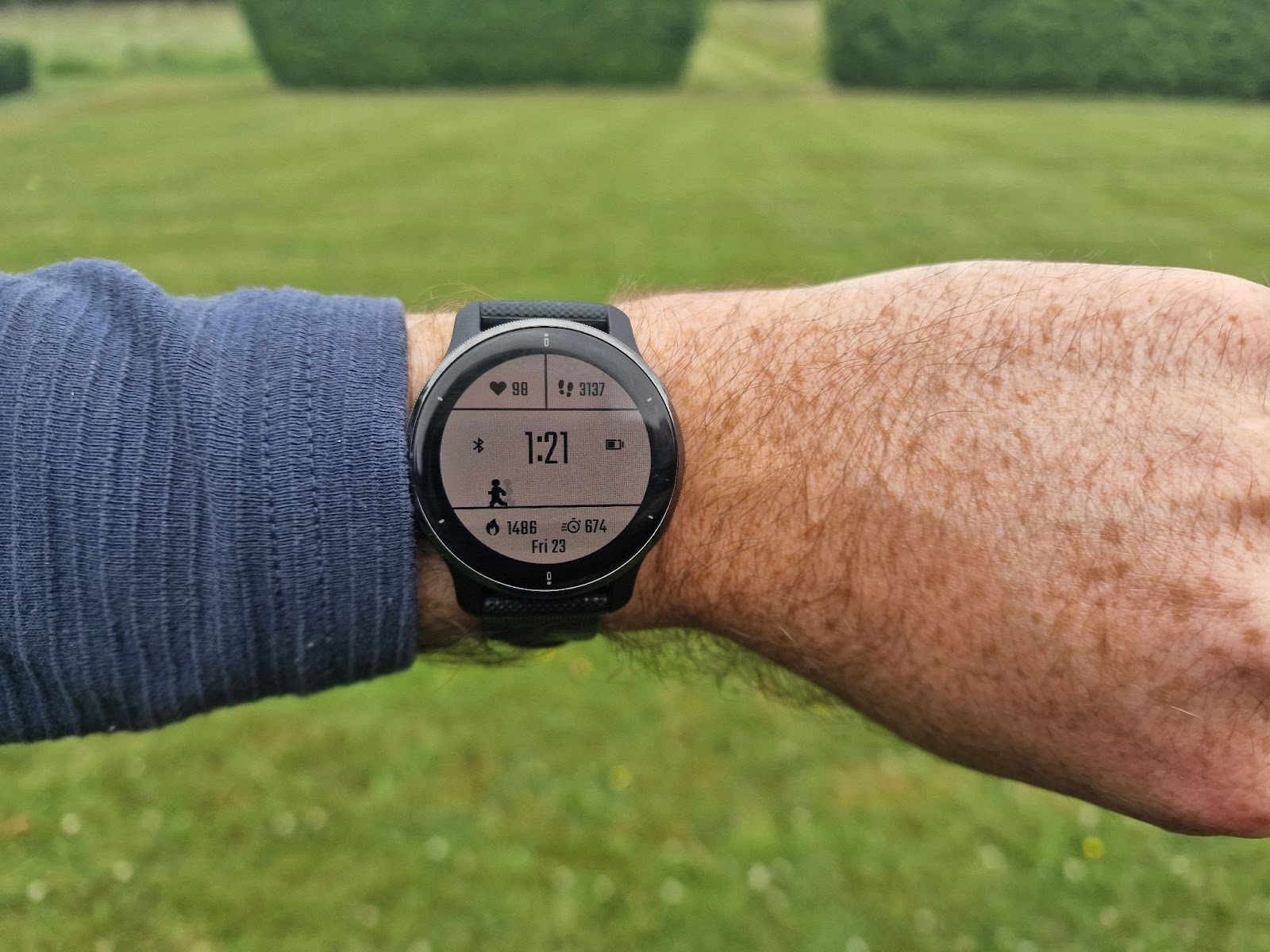
I’ve never been much of a watch wearer and expected to wear my Garmin when exercising and not too often outside of this, but the daily tracking of my steps, sleep, and body battery has me hooked and I’ve now got the dreaded watch tan. Garmin’s Step Goal is adaptive, if you exceed your target, it adjusts so your target is higher, and vice-versa if you don’t walk too much. Seeing my step counter a few hundred short of hitting my goal gives me the little nudge needed to walk instead of hopping on the bus.

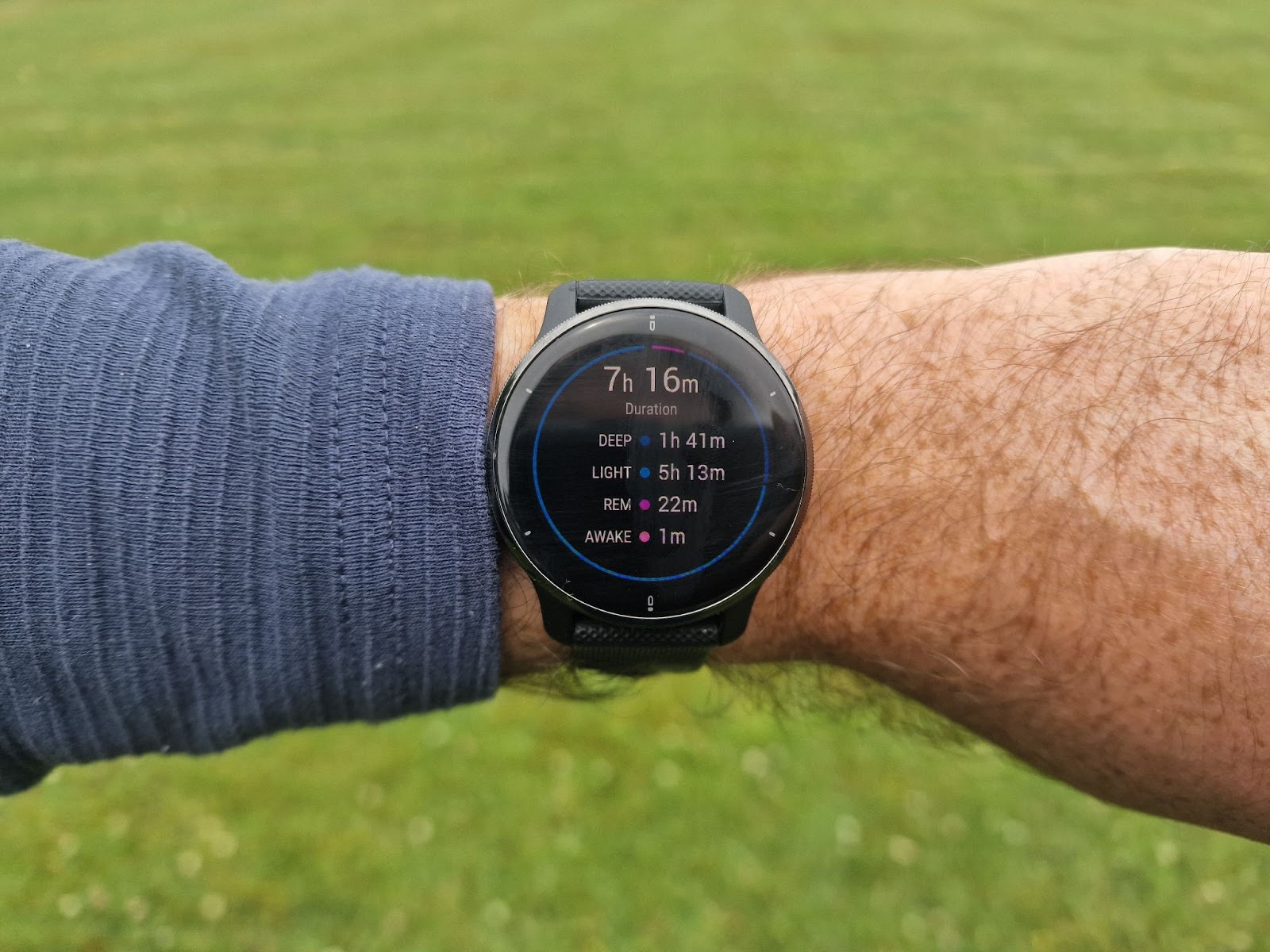
The sleep tracking and body battery monitoring have been a surprise hit for me. I thought they were gimmicky when I first found out about them, but with five months of data, I can see patterns and how lifestyle changes (and a few pints) can impact both.

Fitness Features

Just three button presses are all that’s needed to start recording your activity and you’re ready to go. During the activity, you can set custom data fields so you get the info you need at a glance. I’m not too fussed with pace or heart rate as I’m not training for anything, so mine are set to show distance, elevation, and time. Once you’ve stopped recording, the watch displays a breakdown of the activity, syncs up automatically with your phone, and then goes back to monitoring your health in the background.

If you’re looking for a more regimented approach to your exercise and training, the Garmin Coach helps you train for a 5k, 10k, or marathon. The feature is pretty useful as it breaks down your goals and gives you a custom training plan of long and short runs, and the coach is with you during the runs alerting you to upcoming targets. All in, there are 25 preloaded apps for specific sports and on-screen workouts for the likes of HIIT and yoga.

Battery

The battery has blown me away. I don’t want to worry about charging my watch every night and I don’t want battery anxiety when I’m heading out on a long cycle or hike. Using it as a smartwatch where you’re not tracking any activities expect up to 9 days of battery life and 24 hours of GPS tracking when you’re recording. Compared to the Apple Watch Ultra which is over twice the price, it would be easy to be disappointed with its 36 hours of regular use. One caveat though is that Garmin devices use a proprietary charger, USB-C would be a great upgrade.

Garmin App

Connect, the companion app for Garmin devices is a bit of a love-hate affair. It’s got buckets of data, but not many insights. All the stats and numbers are there, but it can be hard to interpret what exactly they mean and how they’re linked to one another. The design of the app isn’t great either, it feels very dated and miles behind the glanceability and slickness of Apple. I tend to use Strava or Komoot to look back on my past activities.

There’s also the option of downloading additional apps and watch faces through Connect IQ. This is another aspect where Garmn falls behind Apple and watches using Wear OS. There are very few extra apps to download, there’s no WhatsApp, Headspace, or Audible here, instead the offering is more focused on mapping and music apps.
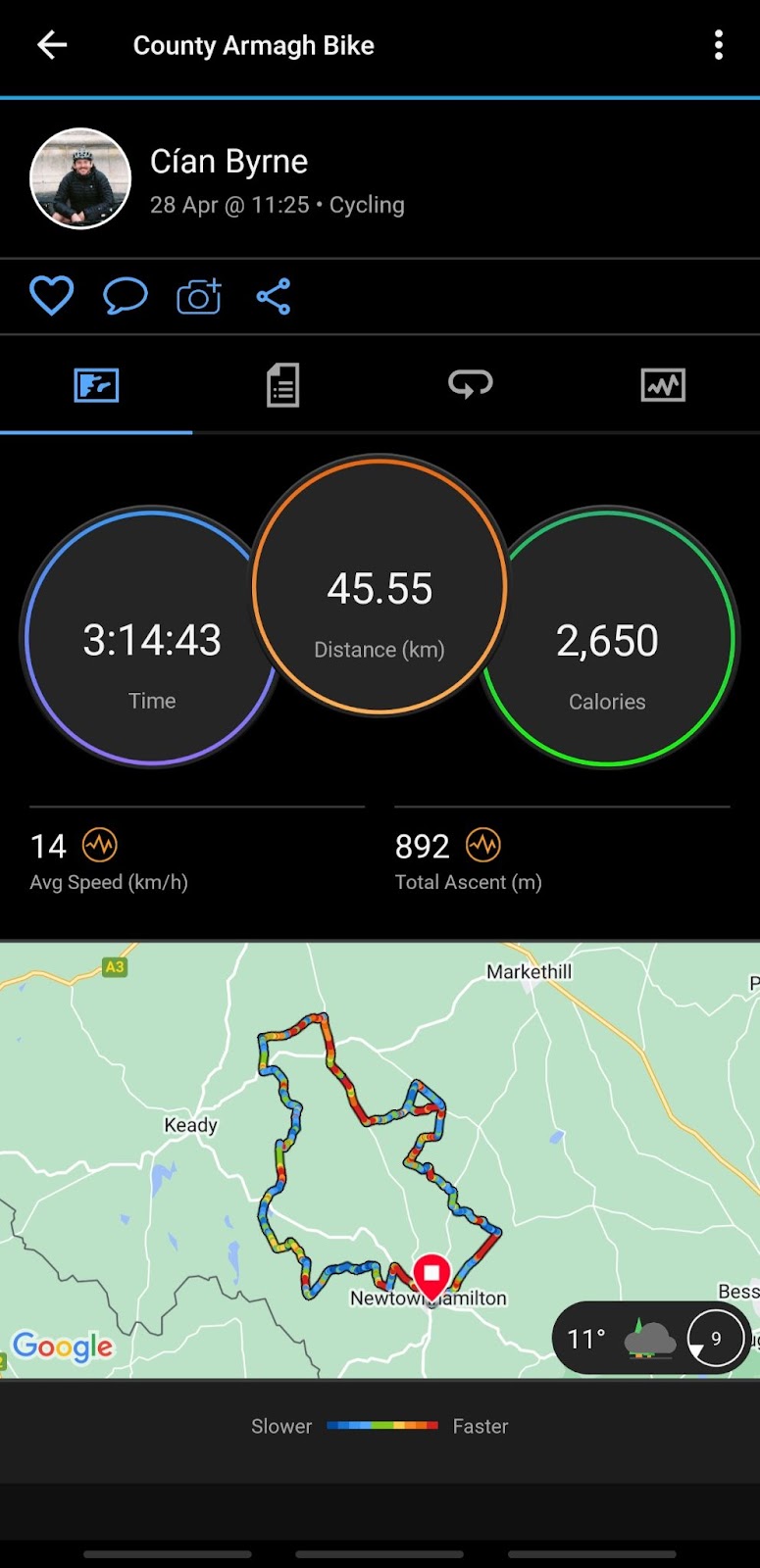
Think of watches as a spectrum. On one end there’s the hardcore activity user that needs weeks on end of tracking and navigation, on the other end is the person who wants a device on their wrist that’s got the same capabilities as their phone. Garmin devices tend to lean towards the former and this is clear once you look through the Connect IQ apps.

Verdict
The Garmin Venu 2 Plus has been a great purchase for me as it strikes the perfect balance between a smartwatch and a fitness tracker for my personal needs. I’d love it if the Connect app was fully redesigned, it feels so dated compared to the watch and is fairly uninviting to use. All the data is great to have, but improvements could be made to make it more useful with insights. The battery is brilliant and more than enough for the vast majority of people and it makes it feel like a useful tool rather than yet another device that you have to worry about charging.

Turtle Beach VelocityOne Flightstick Review

0

I recently built a gaming PC. It wasn’t cheap, but I’ve wanted to do it for years. The main reason was Microsoft Flight Simulator. I’m a sucker for a flight sim. Over the years, I’ve dabbled in Flight Simulator, but the latest one needed a more powerful machine. I was also going to finally have to upgrade my flight controller too. As I pour one out for my mid-nineties SideWinder Joystick, I opened the package kindly sent over by Turtle Beach, and started testing out the VelocityOne Flightstick.

This is a massive upgrade on my Sidewinder, aimed at putting the perfect controller with a wide range of buttons and motion control in the hands of flight sim fans and even space flight games like Star Citizen.

Design and Build Quality

Out of the box, the VelocityOne Flightstick looks great. The Xbox controller-style button in the middle immediately makes me feel this is more aimed at console than PC, but in reality, that isn’t the case – I’ll discuss that later.

In the hand, the stick feels good. While the base is a little plasticky to look at, the stick itself feels premium and almost soft to the touch offering a lot of comfort. Turtle Beach were clever in their design here. The stick itself is quite long, and would be too long only for they’ve included a rest for your hand to lay on. This is both adjustable in height and can be moved to the left or the right of the stick. The beauty here means this stick is perfect for both lefties and righties.

From the base of the controller, you can plug in your wired headset. A surprisingly handy feature for cable management but not surprising that Turtle Beach, famous for gaming headsets, would think of this. There are also some additional USB-C ports on the rear for add ons like the rudder pedals which I’ve not tested out.

One disappointing feature of the design is the controller’s stability on my desk. You can mount this controller, and I recommend you look into it if you’re buying this. At the extremes of the axis, the controller does tend to tip over. Mounting solves this, but it will come at the extra cost of a flight simulator controller mounting solution.

Overall though, this is a minor hiccup. The VelocityOne Flightstick is ultimately, a nice addition to my desk and comfortable to use for fairly extended periods of time.

Performance and Precision

The spring-loaded resistance in the stick feels great to me. Control inputs feel deliberate which probably exacerbates the tendency of the controller to tip over, as I’ve mentioned. For flight sims, a great controller will support just how immersive your experience is. Airbus flights, which fly a sidestick, feel most immersive. But I didn’t feel that immersive experience was broken when flying the likes of Boeing or Cessna plans which are yolk based.

To get the absolute most from your experience, I recommend you spend a lot of time mapping surfaces to your sim of choice. Little things like understanding how to lock the rudder so you can control the nose tiller give you even greater control over your aircraft.

Button Layout and Functionality

Here, the stick absolutely excels.

There is an abundance of buttons on this stick. An almost overwhelming number of buttons, 27 in total. In addition to these buttons, the stick has two “throttle” controls, suitable for throttle and flap settings, a POV hat button and a control wheel. The stick even has a screen on it where you can change settings and get in-game data to display, though I never managed to get this to work on my PC for some reason.

Everything is laid out perfectly for comfort and functionality. The slider controls have great range and support reverse thrust too. By that I mean you can pull back to zero, feel some resistance on the throttle and then lock into reverse.

As I’ve mentioned, you’ll benefit from some time spent on mappings. The default mapping between the VelocityOne Flightstick and Microsoft Flight Simulator was good, but not perfect. Every sim pilot will have preferences for controls they want on the stick versus the keyboard too, so make it your own.

The biggest win for me with this controller is the rudder control. You can buy rudder pedals, but you can also control rudder surfaces by twisting the stick. This was an awesome upgrade for me.

To be honest, the control surfaces were a real treat for me. I came from 8 buttons and a single throttle. Having a quick look hat, pitch control and even rudders completely changed my flying experience.

Compatibility and Connectivity

I mentioned the Xbox logo earlier. I’m not sure there’s anything on PS5 you’d wanted a stick for, but it’s not officially supported anyway. The VelocityOne Flightstick is specifically made for Xbox Series X|S, Xbox One and Windows 10/11 PCs.

I’ve also used my Meta Quest 2 VR headset for flight simming. I couldn’t really come to terms with trying to use the stick while in the headset. I’m sure it’s possible and delivers an even more immersive experience, but it’s not straightforward.

There are some other accessories you might be interested in using alongside this stick. The most obvious is the rudder pedals or the mount I mentioned earlier.

Additional Software

Turtle Beach offer an app that connects to your stick. It’s a bit underwhelming to be honest. You can control light profiles and a few other things, but I found myself using the app once and then forgetting about it. That’s about it for this section.

VelocityOne Flightstick: The Verdict

At around €130, the VelocityOne Flightstick is still a considered purchase. But, let’s be honest here. If you’re into flight simulators or the likes of Star Citizen, you’re going to be investing in a flight stick unless you already have one. I bought my Sidewinder back in the nineties and used it until this year. Controllers like this have staying power, and that’s to be considered when you’re buying.

Sure, we’d all love to have the Warthog HOTAS but that’s a pro-level controller. Also, it doesn’t have rudder control. Which is a massive plus for the VelocityOne Flightstick.

I can wholeheartedly recommend this stick. It’s plastic where it needs to be, but offers enough of a premium feel for me to know I’ll get many years out of this stick.

Prime Day 2023: Everything You Need to Know

0

Amazon Prime Day 2023 is just around the corner. As much as we all give out about Jeff Bezos, the man knows how to run a pretty impressive online shop and an even more impressive online sale every year. With just a few days left until Prime Day 2023, I thought it would be a good idea to pull together a few tips and tricks from my years of being an Amazon Prime customer. Hopefully. this can help you make the most of your pre-Black Friday 48-hour shopping spree.

Disclaimer: See the orange links in this article? They’re affiliate links to Amazon. When you use them, you’re supporting Goosed.ie. You’ll pay the exact same for anything you buy, but Amazon might pay us a small percentage for sending you over there. We really appreciate when you use these links, but also understand you might not like the idea of affiliate links. We don’t let that affect our content, but we wanted to be transparent about it.


When is Prime Day 2023?

Amazon’s Prime Day will take place across July 11th and July 12th in 2023. Ahead of Prime Day, we survey more people in Ireland, asking them if they planned to buy anything during the upcoming sale. 9% of people said they would definitely be buying something. 19% said they were on the fence but would certainly be taking a look at what’s on offer while a further undecided 17% thought a purchase would be unlikely. The remaining 56% said they had no plans at all to buy anything.

With all of the perceived barriers to buying from Amazon.co.uk, 44% of people we surveyed were still weighing up the idea of making a purchase during the Prime Day sale. These are pretty remarkable numbers despite the fact that shops back here are reopening along with the persistent idea of “shop local” which often sits uncomfortably with those who do choose to shop with the UK online retail giant.

I’ve already seen some Prime Day Deals appearing because I’m an existing Prime customer. Actually, that’s the next point.

Amazon Prime Membership

One of the main reasons Amazon runs the Prime Day sale every year is to promote Amazon Prime Membership. Prime Day offers some of the very best deals you’ll find online throughout the year. But the very best value is held back for Amazon Prime members.

Amazon Prime is a premium membership you pay for either monthly or annually. But, is Amazon Prime worth buying in Ireland?

This membership has grown in popularity as Amazon focuses a lot more on Ireland today than they used to. First, they started using local delivery vans and now there’s a dedicated warehouse in Dublin. This means much faster delivery on thousands of products. I’ve placed orders on some items as late as 8 pm and had them delivered at 11 am the next day.

Beyond this sale, that membership gets you access to year-round discounts, faster, cheaper and usually free shipping along with Prime Video, Prime Reading and Prime Music subscriptions also being included.

During the sale, members also get to see Prime Early Access sales. As I said, I’m already seeing Prime Day discounts on items when I visit Amazon.co.uk.

How Much Does Amazon Prime Day Cost?

Well, Amazon Prime Day will cost as much as you can keep control during the sales! The only definite is how much the Prime Membership itself costs.

New customers can try Amazon Prime Membership, free, for 30-days. That means you get to take part in one of the biggest online sales for no extra cost.

After that, you can either cancel your membership or continue it. To continue it will cost around €10 per month or €110 per year. I use Amazon quite a lot. I buy things that are just hard to find in my locality or when I just don’t have time to go shopping. So I actually have the annual membership. It means I get a free month on my membership too.

Watch Out for Lightning Deals

As the name suggests, lightning deals are time-sensitive, so it’s crucial to stay updated and act fast. Amazon releases new lightning deals every few minutes throughout the sale, so keep refreshing the “Today’s Deals” page to see the latest offers. You can also sign up for Amazon’s “Watch a Deal” feature, which sends notifications when specific deals go live.

To increase your chances of snagging a lightning deal it’s worth setting up alerts and reminders. Using Amazon’s mobile app will give you the biggest advantage here of grabbing the deal you want.

I also massively recommended creating a shopping list in advance. Tag up the items you’re looking to purchase and add them to your list. This way, you can quickly search for the products during the sale and check if any lightning deals are available for those items.

Remember, lightning deals are highly popular and tend to sell out quickly. I bought a Bosch cordless drill during the 2019 Prime Day Sale and I still use this every few weeks for DIY jobs. It was the top-selling product during that sale. While it was a bit of a lightning deal impulse buy, it’s paid off in the long term because I acted quickly on a great deal. For me, that’s the perfect example of buying something you know you’ll need at some stage for a great deal.

Use Your Revolut Account

From ASOS to Amazon, and some other stores that don’t begin with A, I do shop on UK websites from time to time. One absolutely shocking thing I’ve learned is that, where possible, pay in Pound Sterling. Many websites, both Amazon and ASOS being prime (sorry) offenders, will set their own exchange rate when you shop in Euro. The rates are ridiculous. Not that long ago, I saved €67 just by switching to paying in Pounds on ASOS.

But how?

revolut ireland

Well, all you need is a Revolut account (note: this is an affiliate link). Once you set up your account, you can get a virtual card immediately while waiting for a physical card (like my nifty Irish Cancer Society card). Once you have a virtual card with some money in your Revolut account and these card details added to your Amazon account, all you need to do is select “Pay in GBP”.

Your Revolut account will then pay in Sterling.

amazon pay sterling

This isn’t a dramatic saving by any stretch of the imagination, but here you would have just saved about 40c. The bigger the purchase, typically, the bigger the saving with this trick.

So there you have it – planning to make a purchase during Prime Day? Let us know on social media what’s in your basket and if you saved with our Revolut trick!

Vodafone OneNumber Launches eSIM Wearable Connectivity in Ireland

There has been slow, but growing, interest in eSIM here in Ireland. We have a more love/hate relationship with our smartphone than ever before and this is where Vodafone sees the big opportunity as they launch OneNumber to the Irish market.

What is Vodafone OneNumber?

Vodafone OneNumber is effectively eSIM or Embedded SIM. This new initiative from Vodafone allows Vodafone bill pay customers to use the same number and plan, along with allowances, from their mobile phone on a smartwatch.

When you get a phone call, both your phone and watch will ring. You’ll be able to access the internet on your watch via your regular Vodafone bill pay allowance or over WiFi.

This is not a free feature, however. The pricing for Vodafone OneNumber starts at €5 per month in addition to your regular phone bill usage charges and monthly rate.

The Benefits of Vodafone OneNumber

Just off the top of my head, I can think of so many benefits to Vodafone OneNumber. Imagine a music festival, where everyone said they just needed to be able to reach each other. Calls and texts are all handled on the smartwatch with no more need to carry around phones. This also means no more annoying phones at gigs.

To be fair, that’s a real personal one. Imagine going for a run but leaving your phone at home. Always contactable or able to make a call in an emergency.

The most practical win here is if your phone dies, you remain fully contactable on your smartwatch. Actually, on a similar point, more so for tablets, if you find yourself hot-spotting a lot, sharing a sim across two devices is better for your battery. However, Vodafone Ireland’s OneNumber doesn’t support tablets; just Samsung wearables.

So we’re into the negatives now.

The Downside of Vodafone OneNumber

While affordable, OneNumber will still cost you more per month. Vodafone has said from €5 per month so this will likely go up on a more expensive plan, or based on usage.

Right now, the biggest drawback of Vodafone OneNumber is the selection of supported devices. Right now, just Samsung cellular-enabled devices only; specifically 5th generation Samsung Galaxy Watches. Here’s the full list:

  • Galaxy Watch 5 Pro 45MM LTE
  • Galaxy Watch 5 44MM LTE
  • Galaxy Watch 5 40MM LTE
  • Galaxy Watch 4 40MM LTE

This means no Apple Watch support or tablet support. Seems a bit of a pity to me.

You also have to be on one of Vodafone’s selected bill pay plans, which means some older customers are likely not eligible. Here are the exact plans:

  • Red Lite
  • Red Unlimited
  • Red Unlimited Max
  • Red Unlimited Sim Only
  • Red Unlimited Max Sim Only
  • RED Business Unlimited Lite
  • RED Business Unlimited
  • RED Business Unlimited Max
  • RED Business Unlimited SIM Only

How to Turn Off Vodafone OneNumber

Stopping your Vodafone OneNumber connection is similar to any other add-ons you might purchase for a plan. Pop into a Vodafone store or visit the Vodafone website. Once cancelled, you’ll receive an SMS confirming the cancellation and you’ll notice your watch loses cellular connectivity (but remember it’ll still have WiFi).

Vodafone OneNumber is available now in Ireland for the Vodafone customers I’ve mentioned above. It’s still very restricted in terms of what it can deliver, but it’s early days. It’s exciting to finally see eSIM options landing into the Irish market. Three eSIM has also just launched in Ireland, expanding the range of options for customers.

Rate Limit Exceeded: Twitter Isn’t Actually Down

I’ve deleted my personal Twitter quite some time ago. I jump onto the Goosed Twitter account from time to time still to see what’s trending. Today, I spotted #RateLimitExceeded. Turns out lots of Twitter users believed the platform was having technical issues meaning Bank of Ireland customer on Twitter are having an awful two days. But the truth is, Twitter has implemented a new limit on the number of posts users can read.

Twitter’s New Rate Limit Explained

Twitter’s ever-controversial owner, Elon Musk, took to the platform today to explain why users are seeing “rate limit exceeded” errors.

Musk claims the platform has implemented limits on the number of posts that you can read based on the type of account you have. This is an effort to reduce data and content scraping by third parties on Twitter.

Now, this also nudges Twitter users towards paying for the platform, no matter how Musk tries to dress that up.

So, if you’re seeing the rate limit exceeded error, I’m afraid it’s probably not going away. It’s a new “policy”.

Bank of Ireland Services Down: Invalid SSL Cert Brings Down Banking365

Bank of Ireland customers cannot access the online banking services right now. Bank of Ireland has stated that they “are aware some customers using our mobile app and 365Online are currently experiencing difficulties” and “are working to fix this issue as quickly as possible and apologise for any inconvenience caused”.

Invalid Cert Causing Bank of Ireland Outage

Customers trying to access their online banking with Bank of Ireland are being greeted with this error.

Bank of Ireland is having an issue with an SSL cert; something a bank should never let get out of hand. SSL certs ensure the data transferred between you and your bank is safe and secure. For this to go wrong for Bank of Ireland is a real head-scratcher and quite embarrassing.

SSL certs expire on a regular basis and need to be renewed. Failure to do so leads to issues like this. There are other possibilities too, such as software developers pushing a self-signed SSL from a development environment to production. But as the Bank of Ireland app hasn’t been updated in three months this seems unlikely.

Ultimately, this is some rather large egg on the face of Bank of Ireland. Trust is essential in the world of finance. Banks moving away from physical to digital spaces too means things like this simply cannot be allowed to happen.

It’s a real shame that Ulster Bank and KBC have left the Irish market. It reduces the pressure on the remaining banks in the market to offer best-in-class services to retain customers. It leads to silly and very avoidable mistakes like this happening.

You can track the ongoing status of Bank of Ireland’s online services using their status page.

Gel Blaster Surge Review: It’s Like Airsoft for Kids

0

I understand they won’t be for everyone, but I grew up with toy guns. I had cap guns, water pistols, laser tag, pellet guns and even the classic spud gun. So my inner child was reborn when the people behind Gel Blaster sent over the new Surge for me to play with.

What is a Gel Blaster?

Gel Blasters are very similar to pellet guns, with one very important, safer, difference. Instead of firing hard plastic balls, a Gel Blaster fires a small ball of gel called a Gellet. The Gel Blaster Surge that I was sent to test out can hold up to 800 rounds, and offers single and full-auto firing modes with a max muzzle velocity of 175fps. So while this is a “toy”, so to speak, it comes with some responsibilities. You can fire up to 10 shots per second which means the Gel Blaster Surge really does offer some firing power.

Pros of the Gel Blaster Surge

I’m going to kick off with the positives.

Easy to Use

The Gel Blaster Surge was up and firing so quickly. It came with some hydrated gel pellets already loaded. All I had to do was screw the hopper onto the top of the blaster and turn it on after a quick charge.

Eco-friendly Gel Balls

The gel balls, or Gellets, are perhaps the smartest part of this whole system. Instead of buying plastic pellets, you buy a small sachet with 10,000 wee dots in it. After soaking these dots for 2 hours, you’ll have 10,000 gel beads to fire. These beads are made from a Super Absorbent Polymer. This is a fully natural, non-toxic, non-irritating, starch-based material.

This approach makes topping up your ammo very affordable too. The sachets of dehydrated pellets cost just €9.99 for 10,000 rounds.

This is another massive plus versus traditional pellet guns.

Good Battery Life

You’re buying this to buy yourself some peace and quiet, right? Well, the good news is that Gel Blasters will give you about 4-hours of distraction for your kids. When it’s time to charge, the Gel Blaster Surge fast-charges off USB-C. I’m not sure if others are like me, but seeing USB-C on products like this just make be trust them more. It’s a relatively simple sign of “modern” and not cheaping out. It somewhat underlines a little bit of confidence in the brand perhaps.

Adjustments on the Go

The Gel Blaster Surge can be quite scary to see in action. It’s powerful, fast and accurate. Now, these are also the most fun elements of the whole thing. But for parents, there is good news. If you don’t want your kids peppering each other at a full 175fps, there’s an included fitting to drop the muzzle velocity fown to 100fps.

You can also swap the gun between single and full-auto rate of fire. Both of these controls can, of course, be easily bypassed by your kids so you’ll need to manage that a little. Or just let them off.

Gel Blasters are Fun as Hell

When I fired this thing, I laughed a bit. It was fun. Even getting shot made me laugh. Then I turned on full-auto and I turned into an absolute giddy schoolboy again. The Gel Blaster Surge is so much fun. You get the feeling of paintball or airsoft at home, on a level much better than anything I’ve experienced with the likes of a Nerf Gun.

Cons of the Gel Blaster Surge

There are a few drawbacks.

The Gel Beads are Messy

It’s claimed that the gel balls will vanish after a few minutes. Apparently, like nothing ever happened. In fact, the packaging states the pellets leave “zero mess”. That just wasn’t the case for me. After quite some time, I did have to sweep up some remnants of gel balls in the living room.

It wasn’t the end of the world, but still. This is a big selling point for parents, so I’d rather you fully understand it’s just not “mess-free”.

Can Be Dangerous

Look, I’m not exactly the most careful person in the world. Within seconds of opening the Gel Blaster Surge, I was being fired at on full auto and laughing to myself. But the packaging states this is suitable for 14 years and up. Parents will have to make this call themselves because the Gel Blaster Surge has, as I’ve pointed out, some impressive, but scary, specs.

It’s not at all beyond the realms of possibility that someone could be hurt by one of these blasters, particularly if left unsupervised without the glasses for example. So while you might be trying to distract your kids for a few hours, you will need to keep an eye on them. These should never be aimed at the head, animals or used away from the home.

Are Gel Blasters Dangerous or Painful?

Personally, I consider the Gel Blaster Surge to be quite safe. I had my better half pepper me with rounds on full auto and while I felt them, I wasn’t hurt. I’ve been shot at point-blank range on full auto while playing airsoft – the Surge doesn’t even come near that experience.

In the box, you’ll find a pair of safety glasses included. I would say these are mandatory for anyone looking to play real-life Fortnite at home. While unlikely to do much damage, contact with an eye is the biggest risk.

Gel Blaster Surge: The Verdict

I love this. I’m not blind to the other narratives that surround “toys” or games like the Gel Blaster Surge. I completely understand that a lot of parents don’t want their kids playing with guns. And that’s totally fine and understandable.

Buy, I was a kid that grew up dreaming of a gun like this. While laser tag was fun, it just lacked the realistic feeling of being hit by a friend that targeted you. Pellet guns were never deemed to be safe enough in Ireland to shoot at anything other than cans on a wall.

The Gel Blaster Surge lets your kids, and let’s face it grown ups, play Fortnite, PUBG or COD in real life at home at a relatively affordable price.

You can grab the Gel Blaster Surge in Currys for €69.99 with some other similar brands being available on Amazon.co.uk.

Updated 28/06/2023: Updated age recommendation from 9 years to 14 years in line with recommendations in the UK and Ireland, not the United States.

Keilidh Cashell: How to Shoot High-Quality Videos on iPhone

I’ve been following Keilidh Cashell (keilidhmua on some socials) for years. I have no idea given I don’t wear make-up, but I’ve always found her posts incredible. I’ve been meaning to write an article on shooting higher-quality iPhone videos for quite some time too. Funny enough, she’s just posted about this herself so now seems the perfect time for a crossover.

Her post comes after a video she created at Harry Style’s playing Slane blew up with countless people asking just how she nailed the quality. You can see for yourself, it looks like she had a pro camera crew with her, but it was all shot on an Apple iPhone 14 Pro Max. You’ll get the same quality with any iPhone 14 Pro or Pro Max and these are the best two phones for the job.

Tip 1: Up the Quality

First things first. When you take your phone out of the box, Apple doesn’t have the fundamental settings maxed out. This is the first thing Keilidh calls out because it “ups the quality like crazy”. And she’s right.

You can do this by:

  1. Open the camera app
  2. Select Video
  3. Tap HD in the top right corner
  4. Change it to 4K
  5. Tap 30fps
  6. Change it to 60fps

This is the single biggest thing you can do for your video quality.

This is the setting you’re looking for. Image courtesy of keilidhmua on TikTok

But a word of caution which Keilidh calls out too. Shooting at this quality will dramatically increase video quality and file size. So you’ll need to be offloading videos in original quality to your iCloud over a high-speed internet connection to make sure your storage doesn’t run out.

Tip 2: Zoom, then Record: Avoid Digital Zoom

The next tip she gives is to choose your zoom level before you start recording. When you use zoom while recording, it’s typically digital zoom. This means you’re not getting the most out of your phone’s hardware. The iPhone 14 Pro series, and all iPhone Pros have three lenses. These can all capture different levels of detail. When you use digital zoom, you’re losing out on these hardware benefits.

To overcome this, Keilidh recommends you set your zoom before you shoot. Better still, do this just be tapping 0.5, 1x, 2x, or 3x on your phone’s screen. This ensures you’ll be using the pretty impressive hardware that Apple has given you to shoot video.

Tip 3: Lighting

Now, sorry. I’m cheating here a bit because Keilidh didn’t call this out. But, lighting is so important. That doesn’t mean lots of lighting – it means the right amount of lighting. Keilidh’s Harry Styles video was fantastic because of how she set up her iPhone 14 Pro Max but also because the lighting was incredible.

Harry was perfectly lit with stage lighting and this meant that Apple’s software could easily identify the subject. Once it can do this, you get lots of post-shoot quality adjustments carried out by the iPhone’s brain – the A16 Bionic. Again, this chip is reserved for Apple’s iPhone 14 Pro and iPhone 14 Pro Max so these will let you shoot the very best videos.

Now you’re ready to shoot your summer story. Shout out to Keilidh for doing the leg work on this one. I highly recommend dropping her a follow on Instagram and TikTok.

Creality Ender 3 Neo – Bringing 3D Printing To Your Home

3D printing up until recently has been something locked out for big companies, and universities and it has been seen as the way to revolutionise the world of manufacturing and design. However, hobbyist creators, makers and innovators have struggled to find an affordable and functional way of bringing 3D printing to the home, until now! I’ve personally been looking for affordable, home setups for 3D printers for nearly a decade since my Product Design days and finally, I’ve found the Creality Ender 3 Neo, starting at $270 the modular design means everything from the hotend to the feeder, can be updated and modified helping even the likes of me to create objects that were once impossible to make. In this review, I’ll be taking a closer look at the Ender 3 Neo and see what all the fuss is about.

Design and Build Quality

The Ender 3 Neo is a robust machine that is built to last. The printer has a sturdy aluminum frame that ensures stability during the printing process, and the build volume is 220 x 220 x 250mm, making it suitable for most types of projects. The machine comes partially assembled, but the remaining assembly process is straightforward and can be done within an hour or two.

One of the standout features of the Ender 3 Neo is its removable build plate. This feature makes it easy to remove your prints from the build plate once the printing process is complete. Additionally, the build plate is made of a material that allows for good adhesion, which reduces the risk of warping and other printing issues.

@just_the1_jon

4 hours into staring at an 8 hour print 🦖 First attempt at a Pokemon print #3dprinting #pokemon #fyp #whosethatpokemon #makersgonnamake

♬ Originalton – Keine Ahnung

The Ender 3 Neo may not be as sleek as some of the more expensive options on the market, namely K1 and Makerbot, but it’s definitely got a solid build that can withstand some rough handling (we don’t recommend testing this theory though, trust me I’ve already done it). The aluminum frame ensures stability during the printing process and the removable build plate is a real life-saver for those moments when you’re struggling to get your print off the plate. We’ve all been there, frantically scraping away at a print with a spatula, hoping it doesn’t snap in half.

User-Friendliness

The Ender 3 Neo is a user-friendly 3D printer that is easy to set up and use. The printer comes with an intuitive interface that makes it easy to navigate through the different options and settings. Moreover, the printer is compatible with different types of filaments, including PLA, ABS, and PETG, making it suitable for a wide range of projects.

Another user-friendly feature of the Ender 3 Neo is its resume printing function. This feature allows the printer to resume printing from where it left off in case of a power outage or other interruptions.

The Ender 3 Neo may not come with an AI assistant like Siri or Alexa, but it’s definitely user-friendly, honestly the whole point is this doesn’t need all the bells and whistles, everything is changeable and upgradeable, don’t be worried I’ve fried two hotends by acting the git but both got changed within 15minutes. The interface is intuitive and easy to navigate, which is great for those of us who get easily overwhelmed by too many options. Plus, the printer is compatible with a range of filaments, so you can let your creativity run wild. Just be careful not to let it run too wild, or you might end up with a plastic spaghetti monster.

@just_the1_jon

get a #3dprinter they said, it’ll be fun they said…taking the whole thing apart to upgrade the hot end, tubing and extruder. why?? because I’m an idiot that’s why still worth it though 🤦‍♂️ #ender3 #creality3d #makersoftiktok #whathaveidone #fuck #fyp #somebodysavemefrommyself #makersgonnamake

♬ Funny Laugh no no no – Sound Effect

And speaking of monsters, the resume printing function is a real lifesaver. No more lost prints due to power outages or other interruptions. You can just pick up where you left off and finish your masterpiece.

The Ender 3 Neo produces high-quality prints that are impressive for a machine in its price range. The printer has a maximum resolution of 100 microns, which means that it can produce detailed and intricate prints. Moreover, the printer has a maximum print speed of 180mm/s, which makes it faster than many other printers in its class.

@just_the1_jon

Successful weekend of 3dprinting the randomest of shit! who’s the next printi-mon? #whosethatpokemon #makersgonnamake #3dprinting #ender3 #makeshit

♬ Pokémon RBGY – Remix – Toni Leys

The printer also has a direct drive extruder, which reduces the risk of filament jamming and improves the overall printing quality. Additionally, the printer has a nozzle that can reach temperatures of up to 260 degrees Celsius, which makes it suitable for printing with a wide range of filaments.

The Ender 3 Neo may not be able to print a real-life unicorn….I know it upset me too, but it’s definitely capable of producing high-quality prints. With a maximum resolution of 100 microns, you can create detailed and intricate designs that are sure to impress. And with a nozzle that can reach temperatures of up to 260 degrees Celsius, you can print with a variety of filaments, including PLA, ABS, and PETG.

Support and Customer Service

Creality is a well-known and respected brand in the 3D printing community, and they have a reputation for excellent customer service. The Ender 3 Neo comes with a one-year warranty, and Creality provides excellent support for their products. Moreover, the printer has an active community of users who provide support and advice on forums and social media groups.

Creality may not have a hotline like the Ghostbusters or those particular Irish phone networks with their woeful customer experiences, but they do have excellent customer service. They offer a one-year warranty on the Ender 3 Neo and are known for providing top-notch support for their products. Plus, the printer has a large community of users who are always willing to help out on forums and social media groups. So, if you’re having trouble with your printer, you can rest assured that you’ll find the help you need, and of course drop us a line on social our resident 3D printer aka me is always up for a talk all things printing.

The Goosed Verdict

The Creality Ender 3 Neo is a high-quality 3D printer that offers excellent value for money. The printer is easy to use, produces high-quality prints, and has a robust build that ensures durability. Additionally, the printer has several user-friendly features, such as a removable build plate and a resume printing function.

Overall, the Ender 3 Neo is an excellent choice for anyone looking to get started with 3D printing or for those looking to upgrade to a more advanced machine. The printer’s affordable price, combined with its impressive performance, makes it a top contender in the market.

The Creality Ender 3 Neo is a great 3D printer for beginners and more experienced users alike. Its solid build, user-friendly interface, and resume printing function make it a real contender in the market. And with its ability to produce high-quality prints, you can let your imagination run wild. So, whether you’re printing a toy for your kid or a prototype for your next big invention, the Ender 3 Neo has got you covered.

Meaco Fan 1056: The Best Fan in Ireland

Look, I know that writing tech articles should be sexy. Not “Only Fans” type of sexy, but also probably not a literal fan sexy. In the past I’ve reviewed Dyson fans, which are literally gorgeous pieces of design. But, with the weather getting bloody warm here in Ireland, I know people are heading out to buy fans. They’re heading out and won’t have Argos to turn to. And that’s a good thing. Because a lot of fans are useless. The Meaco Fan 1056 on the other hand is one my favourite pieces of kit when the temperatures rise.

Fan vs Air Circulator

The first thing to know about the Meaco Fan 1056 is that it fits two categories. It’s a fan, but it’s also an air circulator. I live in an apartment with a mezzanine. That means the upstairs rooms don’t have windows to the outside world. The result is heightened importance on air circulation. First of all for cool air, but also to keep healthy air in the room on my Air Things.

A fan will simply point in one direction and blow air. An air circulator focuses more on general airflow improvements. The Meaco Fan 1056 does this by rotating from left to right, but also up and down.

I first came across Meaco in a warm IFA hall in Berlin last year. The place was roasting and I was doing laps to see what companies were around. I passed Meaco a few times and every time enjoyed the cool breeze their stand offered. Now I have that same fan in my home office and it’s such a little piece of cool air heaven.

I’m sorry Dyson, but you’ve been replaced where I need that cooler feeling.

Meaco Fan 1056 Design, Functionality and Cost to Run

The fan itself does everything you’d want from a fan and more. This is why it’s unlikely to be the cheapest fan in the world you stumble upon. As I mentioned, it offers a wide range of rotation for air circulation. It’s also extremely powerful if you need it to be. Right now, it’s sitting beside me on setting 4. Which is loads, but it will go up to 12 and blow things around your office if you need it to. While it does this, it remains relatively quiet.

The fan can be controlled either from the base (if you bought the tabletop fan like I’m testing) or with the included remote that snaps onto the face of the fan. The remote is a nice idea, but I find it a bit hit-and-miss. I could do without it to be honest and the on-fan controls are grand. One criticism here is that with the fan off, you’ll see the temperature. But once on, this vanishes with no way to automate the fan coming on when a heat threshold gets hit. It does have timers and an eco mode though.

I’ve also connected this fan to my power meter and found it to be rather cost-effective. Sure, an air-con unit would be lovely, but it’s hardly a sensible purchase in Ireland. Plus they cost a fortune to run. At full tilt, with all oscillation turned on, the Meaco Fan 1056 will still run below 25w. So you don’t need to sweat the cost of running it while avoiding the sweat of these heat waves.

Finally, the Meaco Fan 1056 is designed to be moved around to where you need it. It’s got quite a cool leather strap on top, is light and offers enough power options to cater to small and large rooms getting better air circulation.

Meaco Fan 1056: The Verdict

As I said, this is hardly a sexy review. But at the same time, fewer purchases can be more important during the summer months than a decent fan. The Meaco Fan 1056 strays far enough away from those awful standard fans to look interesting while delivering performance that will impress. I wager that if you buy this, at least once you’ll ramp it up to full power just to show it off to guests. And they’ll want to buy it.

At the €129.99 mark it’s not cheap, but it’s a fan you’ll be happy to break out every year. The Meaco Fan 1056 is available from CH Marine, DID Electrical and Currys (currently just €119.99 in both).