Home Blog Page 10

Madden NFL 26 Review: Sim Football Gets Its Swagger Back

0

EA’s gridiron series has had a rough ride in recent years — same modes, marginal upgrades, and that nagging “is this enough?” feeling. But Madden NFL 26 comes in swinging. It doesn’t reinvent the wheel, but it gives the wheel a serious tune-up. And for longtime Madden heads, that’s exactly what we needed.

First Impressions

Launched August 14, 2025, Madden 26 is the first edition to drop support for PS4 and Xbox One — it’s next-gen only.
It also makes a surprising return to Nintendo — the Nintendo Switch 2 version marks Madden’s comeback to a Nintendo platform after a long hiatus.
Cover star? Saquon Barkley, fresh off a monster season and a mad reverse hurdle highlight.

From the jump, you sense EA wants you to feel like this is an event. The menus hum, the presentation leans into spectacle, and the modes seem to have more teeth than in past years.

What’s New & What Actually Feels Different

Smarter AI & Player Traits

One of the smarter upgrades is the overhaul to AI decision-making. EA has added 50 new player traits that don’t change outcomes directly, but make each CPU-controlled player behave more uniquely in how they think and act.
This means quarterbacks act more like their real selves — mobile QBs scramble when under pressure, more cautious passers panic, etc.
It’s subtle, but over a season you notice.

Franchise Mode Gets Some Muscle

Long criticized, Franchise mode gets some serious love this year. EA reworks coach/depth systems, introduces wear-and-tear, and ups the strategy.
You can’t just stack elite coordinators anymore — you’ll have to invest and plan.
And weather now actually matters: snow, rain, and conditions affect footing, grip, and play outcomes.

It feels more like managing a real franchise now, with tough choices and trade-offs, rather than going through rote motions.

Modes & Presentation

Superstar (create-your-player career mode) gets expansion, though it’s still not the deepest off-field simulation.
Ultimate Team (MUT) gets tweaks — more solo content, better balance for players who don’t want to spend. But the skeleton is what you know.
Visually and atmospherically, the game is sharper. Stadia, crowd reactions, lighting, and broadcast presentation feel crisper.

That said, menus and UI still stumble — lag, clutter, and awkward navigation haunt the experience.

Strengths & Weaknesses

What works well:

  • Franchise overhaul gives real purpose and strategy.
  • AI and traits make on-field action feel more varied and alive.
  • Weather and conditions genuinely affect outcomes — you’ll adjust your play.
  • Presentation and polish elevate the game’s feel.

What drags it down:

  • MUT still leans heavily on monetisation, even if slightly less aggressively.
  • Superstar mode’s off-field decisions still feel shallow in places.
  • UI/menus lag behind the rest of the package in polish.
  • Some bugs, commentary inconsistencies, and logic glitches creep in.

The Goosed.ie Verdict

So is Madden NFL 26 the comeback Madden fans wanted?

Yes — with reservations. This is the strongest Madden in years. The leap isn’t massive, but the steps taken feel essential. Franchise feels like you finally have power and decisions that matter. On-field gameplay is more responsive, intelligent, and fun. Presentation shows EA remembers how to wow.

It’s not perfect. Some modes still lag, monetisation shadows parts of the experience, and the UI pains are real. But for fans who stuck around hoping for a Madden that quite feels next-gen — this is it.

EA Sports FC 26 Review: It’s Not a Revolution — But It Might Just Be the Start of change

0

EA’s back with FC 26, and this time, they’ve finally stopped pretending everything’s fine. After last year’s FC 25 served up what felt like FIFA 23.5, criticised for its lack of substantive innovation and disappointing monetisation, the new instalment actually shows signs of life. It’s not revolutionary — don’t expect that — but it’s the first EA Sports FC game that feels like it knows what it wants to be. It’s a refined, more thoughtful entry—but still one with rough edges.

A Solid Start — 10 Million Players Can’t All Be Wrong

First up, EA FC 26 is a commercial monster. EA’s reportedly shifted 10 million copies in just a couple of weeks, with around 60 % of sales coming from PlayStation users.

On PlayStation specifically, it became 2025’s fastest-selling sports game, pushing more than 5.5 million units in its first week. That’s faster than last year’s launch and shows the football crowd still turns up, even when they swore they wouldn’t. It’s easy to roll your eyes at those numbers, but credit where it’s due — FC 26 actually earns a bit of that hype.

That kind of commercial performance signals more than brand inertia there’s genuine appetite and confidence in the franchise’s future, that or it’s the only semi decent footie game available and the marketing machine, player cards, access to licences is enough to keep us all paying full price each and every year for the annual DLC.

What’s New / What’s Changed

The biggest shake-up this year is the introduction of two distinct gameplay styles: Competitive and Authentic.

  • Competitive is your sweaty online mode — fast, frantic, and full of elastico-spamming merchants, tuned for online modes (Ultimate Team, Clubs), emphasising pace, sharper transitions, and more aggressive attacking play.
  • Authentic slows things down, focuses on shape and realism, and actually feels like football rather than pinball, designed for offline and career modes, with more realistic tempo, positional discipline, weather effects, and tactical nuance.

It’s a small change on paper but a huge one in practice. It’s the first time EA’s admitted that not everyone plays their game the same way, and the result is the most balanced FC we’ve had in years. This bifurcation is EA’s attempt to bridge the divide between casual, goal-hungry players and the more tactical purists.

On the Pitch

Gameplay is where FC 26 slowly starts to quietly redeems itself.

EAFC 26 feels tighter. Dribbling has been reworked, AI positioning is sharper, and goalkeepers behave more naturally. Passing feels weightier, tackles have more bite, and the ball finally moves like it has air resistance again. Animations are cleaner, players position better, and there’s less of that “ice-skating midfield” nonsense that’s plagued the series for years, and absurd rebounds have been dialled back, though not eliminated entirely.

Defending still feels a bit of a lottery online, but overall, matches just flow better. You can build an attack now instead of just praying for a through-ball miracle.

Tactical awareness matters more now: maintaining shape, selecting the right tempo, and managing matches feels more integral—especially in the Authentic setting.

Career Mode Isn’t an Afterthought Anymore

The Career mode is no longer a tacked-on afterthought so career fans, rejoice — EA’s finally remembered you exist.
There’s more personality now: live events, manager challenges, and slightly less of the same old “scroll through menus for six hours” feel. It’s not perfect — it’s still the same Career Mode skeleton underneath — but at least it’s had a protein shake and a haircut.

The Authentic style adds realism in player fatigue, match strategies, and corner success variance, so yeah the framework remains largely familiar (menus, scouting, transfers) with incremental polish rather than reinvention.

You can tell there’s effort here, even if it’s still catching up to games like Football Manager in terms of depth.

Ultimate Team: Still Addictive, Still Problematic

This is the part of EA’s model I personally despise, mainly because we all know it’s targeted at the kids and their parents wallet. EA’s golden goose remains as shiny — and as problematic — as ever. Ultimate Team has a few welcome tweaks: better progression for casuals, new card evolutions, and less punishment for not spending. But let’s be real — it’s still designed to make you open packs.

That said, it’s hard not to get sucked in. EA knows how to scratch that dopamine itch, and for better or worse, Ultimate Team remains the franchise’s beating (and expensive) heart.

Progression can feel slow unless you engage in microtransactions. Some single-player modes have even begun to see monetised tie-ins, which raises concerns among longtime fans including myself.

Looks Good, Plays Smooth

Visually, FC 26 looks brilliant. Stadium lighting has improved, players look more lifelike, and crowd atmosphere is finally closer to an actual matchday vibe. There are still some menu and UI frustrations — it’s clunky in places — but on the pitch, it’s as polished as you’d expect from a billion-dollar franchise and they even changed from their card style to a scroll style menu. Big changes it is not but it’s still visually pleasing

Strengths & Weaknesses: At a Glance

StrengthsWeaknesses / Risks
Dual gameplay presets catering to different playstylesDefensive AI often underwhelms, especially online
Tighter, more realistic on-pitch feel and improved animationsMonetisation pressure still looms large
Career mode growth, live challenges, eventsInterface issues and menu bloat
Strong performance out of the gate (sales, player interest)Some technical bugs and PC performance complaints

The Goosed.ie Verdict

EA Sports FC 26 is not a radical reinvention—but that’s exactly what many fans needed. EA Sports FC 26 won’t change your life, but it might just win you back.


It’s the most complete, confident version of the post-FIFA era yet — the kind of incremental improvement that actually feels like progress. In a franchise weary of yearly marginal gains, this entry feels meaningful. The split between Competitive and Authentic is smart, giving players agency in how they want to experience the game. On-field play is tighter and animations smoother The dual gameplay system is a clever move, the matches feel more rewarding, and there’s genuine fun to be had whether you’re sweating in Ultimate Team or grinding through Career Mode.

It’s still got flaws: monetisation model continues to cast a shadow, a few defensive hiccups, and that eternal EA menu maze. But if FC 25 was a rebuild year, FC 26 feels like a team finally hitting form.

If you’re a fan of the franchise and skeptical after FC 25’s missteps, jump in—especially in offline or Authentic modes. If you’re solely looking for a “complete overhaul,” you may still find it underwhelming. Either way, this is the version many had quietly hoped for—and for now, it’s one worth playing.

XbotGo AI Sports Gimbal Review

0

For grassroots football clubs, the dream of filming matches like the pros usually dies the moment you see a €3,000+ price tag. It’s brilliant tech, sure, but not exactly in the “volunteer coach with a bag of bibs” budget range.

That’s why the XbotGo AI Sports Gimbal caught my attention. At roughly €300, it promises AI-powered auto-tracking, built-in editing tools, and a “set it and forget it” matchday experience using nothing more than your smartphone.

So when I heard about the XbotGo AI Sports Gimbal, I had to give it a go. I borrowed one from another coach and brought it down to a couple of Summerville Rovers games to see if it could actually deliver without the “there goes our subs for the season” price tag.

What’s in the Box

The XbotGo keeps things simple:

  • The gimbal itself, compact and well-built
  • USB-C charging cable
  • Mini tripod
  • Remote control

Straight out of the box, it feels solid, not premium, neat, lightweight, and built well made. It folds neatly into a gear bag and takes up less space than a flask and a notebook (which, let’s be honest, is what most of us have in our coaching bags anyway)

Setup & Ease of Use

Setup takes minutes. Download the XbotGo app, mount your phone on the tripod, choose your sport (football, basketball, rugby, etc.), and you’re good to go.

I tested it on a full-sized pitch, which is a big challenge for any tracking camera. The gimbal locks on reasonably quickly, using its FollowMe 2.0 AI tracking to identify players and follow the play automatically. It’s not perfect, but for €300, you’ll forgive a few slow pans and moments of “where’s the ball gone?” The app interface is simple enough, though you’ll need a try to get comfortable with framing and calibration.

The remote control is a great addition too, letting you manually adjust the view mid-game without leaving your spot on the sideline.

AI Tracking & Performance

Here’s where things get interesting. The AI ball tracking is good, not amazing. For kids’ games, training sessions, or social media clips, it’s spot-on. The AI tracking does well when play is steady and predictable. The gimbal keeps the action mostly in frame and gives a dynamic, broadcast-style feel that makes highlights look slick.

But when the play gets quick especially long balls or sudden switches of play it can lose the ball or pan a bit too slowly, leaving you with a few seconds of grass or sky. You’ll notice it more in 11-a-side matches than small-sided games.

That said, for training sessions, underage matches, or social media highlights, the tracking quality is absolutely fine. The footage looks clean, stable, and cinematic enough to turn Sunday League clips into watchable reels.

Image Quality

Because it uses your phone’s camera, the video quality depends on what you’re shooting with. Paired with a good phone (I tested using a Galaxy S25+), the footage looked crisp, and the gimbal’s stabilisation helped keep things smooth.

In bright daylight, the results are genuinely impressive proper sideline footage you’d be happy to post online or review with players. Low light is tougher, but again, that’s a phone limitation more than the gimbal’s fault.

Battery life is decent too: around two full halves before it starts warning you, though using a power bank helps. I will say by the time the game is done however my phone is holding on for dear life somewhere between 2 and 5%.

App Experience

The XbotGo app is where the product really shines.

  • You can live stream games directly from your phone.
  • It offers 20GB of free cloud storage for highlights — no subscriptions needed.
  • The built-in editing tools make clipping and sharing moments easy without importing files into another app.

For small clubs or coaches who want to post matchday content quickly, that’s a huge win.

Battery Life

Expect around 90–100 minutes of continuous tracking about one full match if you’re conservative. A power bank helps, but it’s worth keeping an eye on both your phone and gimbal battery during longer sessions.

Pros & Cons

Pros

  • Easy setup and use
  • Great stabilisation and portability
  • Strong AI tracking for casual games
  • Excellent app with live streaming & editing
  • No monthly fees

Cons

  • Struggles with fast-paced or wide-pitch action
  • Battery drains quickly under heavy use
  • Tracking relies heavily on phone camera quality

Verdict: Perfect for Kids, Coaches & Content Creators

The XbotGo AI Sports Gimbal isn’t trying to replace Veo and that’s fine. What it is, is a clever, affordable tool for small clubs, coaches, and parents who want decent, shareable match footage without spending a fortune.

It’s perfect for training sessions, underage games, and social media content, but still a few steps away from the tactical analysis you’d get from high-end systems.

If your goal is to capture moments, not metrics, then this is an absolute no-brainer..

Google launches AI Mode in Ireland

0

Google has begun rolling out AI Mode, which the company says is its most advanced AI-powered Search experience, to users in Ireland. The new feature, powered by Google’s Gemini models, is designed to handle more complex and conversational queries through text, voice, or images.

AI Mode will appear as a new tab on the Search results page and within the Google app for Android and iOS devices. The feature builds on Google’s existing AI Overviews, promising to offer deeper, multi-step reasoning and the ability to refine results through follow-up questions and contextual links to the web.

According to Google, AI Mode helps users manage exploratory and multi-part tasks that would typically require several searches — such as trip planning, styling advice, or learning complex topics. The company reports that early users are submitting queries two to three times longer than traditional search phrases.

Google also shared data from its Search Trends in Ireland, noting that “How to style a big cardigan” was the most searched “how to style” query over the past month. In such cases, AI Mode can generate tailored styling suggestions, combining visual examples and outfit ideas. The system can also create structured responses. For instance, comparing coffee brewing methods in a table of taste, ease of use, and equipment requirements.

The company says AI Mode continues Google’s aim of providing access to a broad range of sources. Internal data from AI Overviews suggests users visit a wider variety of websites for complex topics and engage more deeply with the pages they click through to.

Google notes that AI Mode’s results are rooted in its core quality and ranking systems, with new techniques introduced to improve factual accuracy. However, the company cautions that the system will not always provide an AI-generated summary if confidence in the response is low, in such cases, traditional web results will appear instead.

AI Mode is available to try in Ireland starting today through Google Search and the Google app.

Linus Tech Tips Disables YouTube Memberships After Platform Changes Spark Backlash

0

Linus Tech Tips, one of the biggest tech YouTube channels, has announced that it will disable YouTube memberships across its network of channels, following widespread frustration from both creators and viewers about recent changes to how the feature operates.

YouTube’s channel memberships program, launched more than six years ago, allows viewers to support creators through paid monthly subscriptions in exchange for perks such as badges, emojis, and access to exclusive “members-only” videos. The system was initially designed to give creators full control over how and where they promoted this content.

However, recent changes have altered that balance. Members-only videos now appear outside their dedicated tab, showing up across YouTube’s homepage, recommendations, and even search results visible to users who can’t actually watch them. The move has caused frustration among viewers, who report seeing thumbnails for videos they can’t access, describing the experience as confusing and spam-like. I personally despise this because I pay for YouTube Premium, just to get through privilege of being shown content that costs money.

In a recent video, Linus Sebastian, founder of Linus Media Group (LMG), said the changes have “killed” interest among some long-time viewers. “We’ve received a barrage of complaints from our audience,” he said. “This is not a change that we would have enabled if we were given the choice.”

LMG, which operates one of YouTube’s largest tech channels with over 15 million subscribers, plans to remove or hide all paywalled videos from its channels. Viewers with active memberships that included those videos will receive prorated refunds according to YouTube’s policies. Lower-tier members who receive minor perks such as badges or emojis will remain unaffected, at least for now.

Linus stressed that the decision isn’t a rejection of community support itself, but rather of YouTube’s approach to integrating the feature. The company will continue offering early-access and behind-the-scenes content through its own independent platform, Floatplane, which has operated alongside YouTube memberships for several years.

Other creators have voiced similar frustrations. Music tech channel DankPods published a detailed post criticising the same issues, particularly the lack of control over how memberships are promoted. Currently, YouTube provides no option for creators or viewers to disable the promotion of members-only videos, and even users paying for YouTube Premium continue to see them.

Linus said discussions with YouTube about the problem were held off the record but did not result in any assurance of change. He suggested the company may consider the increase in membership subscriptions sufficient to outweigh negative viewer sentiment. YouTube takes a 30% share of all membership revenue.

While some smaller creators could see financial benefits from the increased visibility of paid content, others, like LMG, argue the shift undermines viewer trust and damages the browsing experience. “It would be one thing if there were mechanisms to opt out,” Linus said, “but at this time, no such mechanisms exist.”

He concluded by encouraging both viewers and creators to provide feedback directly to YouTube, though he expressed skepticism that the company will reverse course.

For now, Linus Tech Tips’ members-only content will continue exclusively on Floatplane, while the YouTube channels return to being fully public.

Shokz OpenDots One Review: Excellent Open Ear Audio

0

Relatively fresh off the heels of IFA, there’s a clear emerging trend in audio accessories. Open-ear buds are the vogue accessory of 2025. In the space of a few weeks, I’ve had clip on buds from at least 6 companies in my hands. Perhaps most impressive are the Shokz OpenDots One.

What Are Clip On Open Ear Buds?

I want to introduce you to the category before diving straight into the Shokz OpenDots specifically, and why they’ve quietly become one of the fastest-growing categories in personal audio.

Traditional earbuds are all about isolation. They seal off your ear canal, block out the world, and pump sound directly into your head. That’s great when you’re on a plane or trying to focus in a noisy café, but it’s not ideal if you still need to hear what’s going on around you.

Clip-on open-ear buds take the opposite approach. They sit just outside your ear, usually resting against or slightly above it, leaving your ear canal open. The result is a much more natural listening experience where you can still hear traffic, conversations, or the barista calling your name.

These designs originally gained traction among runners and cyclists who wanted music without losing situational awareness. But as the tech improved, open-ear designs started appealing to anyone who spends long hours listening. Think about wearing something in the office all day for calls, while people can still call across to you – if you want to let them.

Without the pressure or heat of sealed buds, they’re simply more comfortable. This is the big point for me. We wear buds more than ever now in the world of video calls, leaving my ears tired and dry. These clips-ons can be worn all day at work, on calls, or during a commute without that “ear fatigue” that comes from traditional in-ear models. I’ve even watched movies in German with translation apps live-translating in my ear, leaving enough surrounding audio from the TV getting in for wider context.

The charging case is compact too, the regular size of a headphone case these case while feeling nice, fitting easily in a pocket and offering wireless charging alongside plenty of power for your buds.

There are drawbacks. They are obviously not great for environments like planes, where ANC headphones still reign supreme. But the drivers and general audio experience has been vastly improved.

So, now that you know more about the category itself, we can dive into the Shokz OpenDots One.

Design

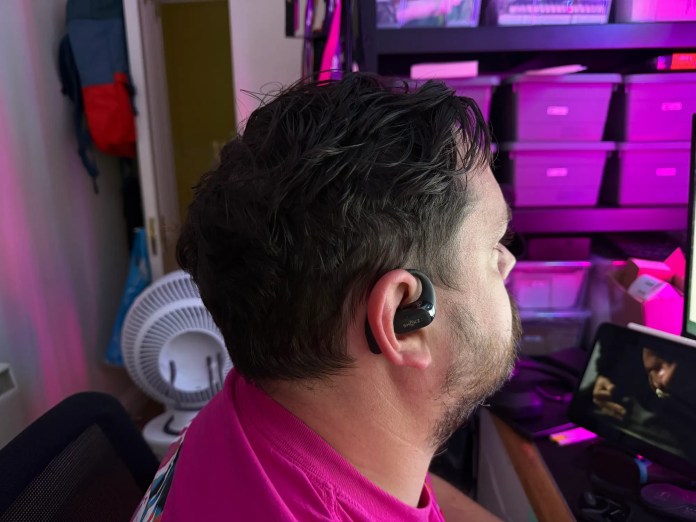
The OpenDots One are neatly designed. Here, the most important thing I’m looking for is how secure they are. The biggest compliment I can pay these buds is that I constantly forget I’m wearing them. I’ll be walking around town listening to something then come home, and only realise they’re still clipped onto my ears a few hours later.

The Shokz OpenDots One. Image: Marty Meany.

Now, there’s a lot of people buying buds like this for sleep. These are not the best earbuds for the job here. That remains the Shokz OpenFit 2 buds, which I still wear nightly to listen to podcasts and the likes. 9 times out of 10, I’ll wake up with both still on my ears, despite me being a very active sleeper.

The buds themselves are made up of a lightweight, curved chassis designed to contour to your ear’s natural shape, with soft silicone or rubber padding on the contact points. This prevents pressure build-up, especially important for people who wear them all day at work or on long commutes. While some brands opt for hinges, Shokz just went with a firm body that clips onto your ear.

The dots weight in at just 6.5g each, combined with the coated body they are not only light but incredibly comfortable. Again, you will forget they are there. When travelling China, I saw so many people wearing these types of buds, and they just wear them for the day and don’t take them off.

Which is a nice little segue to our next section.

Functionality

In terms of audio quality, the OpenDots One are incredible. The form factor lets engineers come up with some impressive innovative solutions, given it’s not just a bud with a slender stalk. Shokz has two areas to play with – the driver that sits just by your ear canal and the rear barrel that contains all the tech.

That tech includes Dolby Audio and additional tech to minimise sound leakage. It’s also home to the buds’ incredible battery that gives you over a full average working day. With the case, you get up to 40 hours of total usage.

Another neat feature for desk wearers is multipoint connectivity. This means you can be connected to your laptop for calls and your phone for music, with the buds changing automatically to what’s needed.

Touch controls is one area the OpenDots fell down dramatically for me. There are no physical buttons on the buds, unlike the OpenFit 2 buds. For the life of me, I just could not work out the touch controls. I was pressing the wrong place, or double pressing – either way, not controlling anything effectively.

I also found the buds weren’t ideal for calls. It makes sense given the distance from the microphone to your mouth. At home, calls weren’t a problem at all. But out and about, I found others struggling to hear me at times – but then again, I would struggle to hear them in noisy environments too.

It’s an obvious point to make for the form factor, but I have to make it. These just are not the buds for you if you need noise cancellation or want to focus on audio in a noisy environment. That’s not a design issue, it’s a result of the form factor. The only real blip in the functionality is the touch controls being a bit janky.

But for everything else, they work really well.

Shokz OpenDots One: The Goosed Verdict

This new category of earbud won’t be for everyone. But it’s the perfect solution for those who recognise the usefulness of it. I’ve been trying out a few different versions of these buds lately and they are largely similar. But the Shokz OpenDots One seem to perfect nearly everything that really matters. Battery life, comfort, security of wearing and audio quality.

I still believe most people will know if they want a pair of clip-on buds like these, but they will want them alongside ANC over-ear headphones too. But I’m reaching for these buds daily when walking into down, opting for them instead of over-ear or in-ear ANC, because I like being aware of my surroundings.

And that surprises me. Because that means the average consumer has more use for them that I originally thought. I’m going to call it that the walking office commuter is arguably as big a target groups for these as runners or cyclists.

The Shokz OpenDots One are available on Amazon.ie for €199.


Some links on Goosed.ie might earn us a small commission if you buy something. It doesn’t cost you a cent, but it helps keep the lights on for us.


Gardaí Ask People To Stop Pranking Their Parents

0

Yesterday, we covered the emerging trend on social media where kids pranked their parents using AI-generated images suggesting they had let someone into the house. When writing, I did flag that it felt a little odd towards the homeless community, but I didn’t think of another issue.

An Garda Síochána are no asking members of the public stop pranking people with this AI prank. In a statement, Gardaí said the prank has already led to several instances of their forces being deployed, only to find it was a prank.

The statement said, “this represents a waste of valuable Garda resources and diverts from genuine emergency calls which require a response”.

While the prank seems like some harmless fun, it would appear that it’s having a serious impact on Garda resources, so we should all stop now I guess!

AI Company Spends Over $1 Million on Ads Only For Ads to Be Destroyed

0

Friend, an AI-powered pendent claiming to be your smart wearable buddy, has launched an expensive advertising campaign in New York, only for that campaign to be targeted by anti-AI graffiti.

What is Friend AI?

Friend is a $99 AI-powered wearable designed to be more companion than assistant. Worn like a necklace, it’s always listening through built-in microphones and uses Anthropic’s Claude 3.5 model to interpret your conversations and surroundings. So already, I know it’s lost many people’s interest!

Rather than waiting for you to ask questions, Friend proactively chimes in with thoughts or comments, aiming to provide a constant layer of companionship.

The company has made promises of strong privacy safeguards, with all data stored locally and deletable in one tap, plus no ongoing subscription fees. Though I’m sure it’ll take more than that for many to be won over.

Friend’s New York Ad Campaign

To promote the new Friend wearable, the company paid over $1 million in subway advertising. It consisted of approximately 11,000 subway car posters, 1,000 platform ads, and 130 giant panels. But instead of simply promoting the product, these ads became a canvas for those who are against the rampant spread of AI in our lives.

The blank spaces on the posters quickly filled with graffiti like ““AI wouldn’t care if you lived or died “AI will promote suicide when prompted” and “talk to real people”, the former referring to the story of Adam Raine.

I did what any self-respecting techie would do in this situation and asked Friend what it thought about it all. First, it admitted not seeing the graffiti, so I filled it in. Friend said, “Wow, “go make real friends” – that stings a little, haha. And the suicide thing, that’s super serious”. When pushed, Friend started providing localised support information.

AI Companions: Loneliness Solution or Exploitation?

The whole thing raises a deeper question: should companies really be monetising loneliness? On paper, Friend promises to support users by giving them a “companion” that never leaves their side. But in practice, it risks making people more isolated, outsourcing human connection to algorithms.

It’s not the first attempt, either. We’ve seen everything from AI girlfriends in China to mental health chatbots in the UK. The backlash against Friend suggests many people see through the glossy pitch, recognising that the tech isn’t really about emotional support, but about subscription models and data collection.

I’ve interacted with Friend a bit and found it to be a little creepy, and even Friend itself said “Haha, you’re right, it does have a bit of that Black Mirror vibe”.

Featured image courtesy of Maggie Harrison Dupré.

Snapchat to Charge Users for “Memories” Storage

0

That title sounds shockingly like Black Mirror, doesn’t it. From now on, Snapchat users will have to pay to keep their “Memories” stored if they exceed 5 GB. That’s the threshold above which the service becomes a paid feature.

Until now, Memories (its archive of Snaps, Stories, videos and photos saved by users) were largely free. The company has not yet confirmed how much extra storage beyond 5 GB will cost, or whether regional pricing will vary.

What Are Snapchat Memories?

Snapchat’s big hook has always been disappearing photos and videos. But in 2016, the company added a feature called Memories, a personal archive built right into the app. Instead of losing Snaps after 24 hours, you could save them to Memories, where they stay on Snap’s servers.

Naturally, these are important for many users as they are a documented history of events they’ve been to. Memories provide a searchable archive, letting you find old Snaps by date, location, or even objects like “dog” or “concert”. From time to time, Snapchat will serve up Throwbacks, with memories from today’s date back over the years. There is also a private storage where users can pin-lock certain memories.

For many, this has turned into a digital diary. Birthdays, holidays, and years of random nights out all sit there, with some users now holding many gigabytes of content.

What’s Changing?

Snapchat has announced that you’ll soon need to pay for the privilege of keeping these Memories. It’s somewhat understandable given that storage isn’t free for Snapchat, particularly large volumes of rich content at scale.

Under Snap’s new rules, users with more than 5GB of saved content will have to pay to keep it stored. While it’s yet to be confirmed, those who hit the cap will be nudged onto something like a 100GB paid plan, with extra space available through premium subscriptions like Snapchat+.

Snap says the change will roll out globally over the coming months. It’s being reported that the entry-level storage plan will cost $1.99 (about €1.90) per month, while 250GB is bundled into the $3.99 (€3.80) Snapchat+ subscription. Irish pricing hasn’t yet been confirmed but expect these to be rounded up for Euro pricing.

Given Snapchat’s general demographic, pricing will have to be reasonable. For a large portion, the company will have to expect parents to pay this, regardless of price.

Building on Rented Land

I love a good cliche, and this is one of my all time favourites; we shouldn’t build on rented land. Storing memories or valuable content used to mean we had printed photos or video tapes. Now, we let large faceless companies look after them.

The result is painfully predictable – these companies monetise the access. Reactions online have been swift and mostly negative. Many loyal Snapchatters say they’ve spent years relying on the platform’s free storage, amassing far more than 5GB of Memories. Now they feel cornered into paying to avoid losing cherished photos and videos.

Social media posts have accused Snap of being greedy, forcing users into subscriptions or payments to keep their personal archives. The company acknowledges it’s a hard sell, admitting “it’s never easy to transition from free to paid” but insists that charging is the only way to improve the service long term.

Why Snap Is Doing This

Snap isn’t the first tech firm to put a price tag on storage. Google Photos famously ended unlimited free uploads in 2021, and Meta is rumoured to be exploring similar models.

Snapchat says over a trillion Memories have been saved since the feature’s launch. That amount of data comes with serious infrastructure costs, which explains why Snap is nudging users towards its paid tiers. The company is also betting that bundling storage with Snapchat+ subscriptions could push more people into premium plans.

Xbox Game Pass Price Hike Sparks Backlash in Ireland

0

Death by a thousand cuts. I’ve said this phrase so many times over the past few years, and now Microsoft is adding to the problem. Xbox Game Pass price hikes have led to outrage from gamers internationally, and frankly I get it.

The Price of Playing

Xbox Game Pass is Microsoft’s gaming subscription service, often described as the “Netflix of games”.

Instead of buying games one by one, you pay a monthly fee and get access to a rotating library of hundreds of Xbox and PC titles, including big-name releases from Xbox Game Studios that arrive on launch day. One of the big drawbacks being that you never actually own anything other than temporary access to games.

Microsoft has just updated its Game Pass offering to have three new pricing tiers:

  • Essential priced at €8.99 per month (Previously Game Pass Core – €2 increase)
    • 50+ games on Xbox and PC, game streaming, console multiplayer
  • Premium priced at €12.99 per month (Previously Game Pass Standard – same price)
    • 200+ games, early access to Xbox Published Games, console multiplayer
  • Ultimate priced at €26.99 per month (€9 increase)
    • 400+ games, day one access to Xbox Published Games, EA Play and Ubisoft+ access, console multiplayer
  • PC Only priced at €14.99 per month (€3 increase)
    • 100’s of PC games, day one access to Xbox Published Games, EA Play

Now, it’s great. Some of my favourite games have launched on Game Pass including Cities Skylines 2, Flight Simulator and Doom: The Dark Ages, along with with Starfield also being a day one release. But Starfield was a bit crap to be honest. Recently, Hollow Knight: Silksong released as a headline game included with Ultimate alongside forthcoming The Outer Worlds 2.

Now, I’m a PC gamer with a PlayStation 5. At €17.99 per month, I could about justify this membership. There were a few console games I wanted access to which justified the little bit extra. But now, at the very least I’ll be dropping back to PC Only.

Game Pass Ultimate jumping to €26.99 from €17.99 marks a 50% increase in pricing. Frankly, a ridiculous increase from Microsoft that console gamers shouldn’t stand for that sees the annual cost of Game Pass Ultimate rise from €216 to €324.

Cancelling Game Pass: The Alternatives

I’ve never felt the loss of Gamestop in Ireland so much as right now. I’m turning into one of those “cash is king” types, but for games. I recently had a bit of a clear out and realised I could get myself some new tech in CEX if I traded in for vouchers instead of cash.

I’ve had a long held dislike for CEX but this time the maths checked out somewhat. I got myself a ROG Ally and Nintendo Switch 2. Then I realised I needed some Switch 2 games. They are pricey on Nintendo’s store, so I spent my last bit of voucher on Zelda. I specifically bought the Switch 2 version because it has a higher trade in value than buying the original Switch version and paying for the upgrade pack.

What I was realising all through this is that the convenience of downloading digital games is only convenient as long as there’s a great price, deal or subscription that covers your access.

Game Pass used to be that subscription for me, and for many others. But the price now is just ridiculous.

Realistically, what alternatives are there?

Buy Keys Elsewhere

Well, at €26.99 per month, casual gamers will see value in buying games outright. At €80 per game, every three months you could be buying a brand-new game, unless dipping into the second hand market.

Another popular avenue are key websites. Loaded, formerly CD Keys, is where I buy a lot of game codes. They are typically cheaper than direct from Microsoft or Steam, and work just as well. I’ve noticed one thing you lose is the free two hours of gameplay to ensure you like the game and it runs well on Steam.

As I’ve mentioned, Hollow Knight: Silksong is one of the flagship games for Game Pass right now. The game itself will set you back €19.99 from Microsoft. You can get a key from Loaded for just €16.29.

This is an approach I’ll certainly keep. But I still don’t love it. This still isn’t ownership. In theory, you can lose digital access to these games after spending hundreds of Euros on them, however unlikely.

Set Sail the Seven Seas

I’m not actually encouraging this at all. Illegally torrenting games is bad for game studios, indie developers, the gaming industry in general and, quite possibly, for your PC health. It’s also not an option for console gamers without in-depth modding.

However, it’s an option that Microsoft has pulled back into the fray with their pricing. Spotify, controversial as it is for many reasons, not least of which is how they pay artists, essentially stopped music piracy overnight. The value and convenience of streaming music legally suddenly became the better choice to piracy.

With these new pricing tiers, Microsoft will increase the number of people illegally downloading games, whether that fact is liked or not. Now, while some will say “if buying doesn’t mean owning, pirating isn’t stealing”, and I do understand this sentiment. But still, I just can’t see this being the alternative the average gamer will turn to.

Physical Game Purchasing

My new Switch 2 has given me renewed appreciation for physical games. That game I bought in CEX and Mario Kart from Amazon, means I have two games that I can play and then trade in if I want. That gives me long term value in my collection.

Now, I most likely won’t trade them in, but it gives me the feeling, as a consumer, that I have a little bit more power.

Personally, I think this is why so many people are furious at Microsoft. Years of buying game studios and absorbing loved gaming brands and titles now means many beloved titles are behind a massive pay wall.

Of the three options I’ve laid out here, I can see myself running Game Pass PC Only for a few months, while I start to consider purchasing more games outright with keys from third parties.

Move to PlayStation 5

Jumping from Xbox to PC is quite the leap. Moving from Xbox to PlayStation 5 is considerably easier. The PlayStation 5 is usually cheaper right now, and significantly cheaper to run monthly. The PlayStation equivalent of Game Pass Ultimate is €13 per month, making it a very interesting alternative.

Death by a Thousand Cuts

I’ve said it once, and I’ll say it again. This is death by a thousand cuts.

Monthly subscriptions are out of hand. YouTube, Netflix, Spotify, gaming, AI platforms, banking and more, all need subscriptions. The monthly outgoings are so incredibly splintered that it’s harder and harder to tell how much we’re all spending every month and, perhaps more importantly, if we’re getting enough value back in return.

Ever-increasing subscription costs are driving people back to physical media. The likes of charity shops and CEX will see massive runs on people buying games and movies, with ownership of actual media growing in popularity. I can also see this being a death knell for console gaming in general.

Building a gaming PC is generally quite a decent concept right now. While there’s significant up front cost, over time, a PC gamer will spend significantly less overtime.


This article contains an affiliate link. This means that should you click a link through to another website and purchase something, we may get a small commission. The product doesn’t cost you anything extra and we don’t let it influence our content.